Demo: live environment

Integrating live power grid API data into SVG.

A lightweight browser container renders the SVG scene while your app keeps control of data. This API is updated every 5 minutes.

Data from https://api.energidataservice.dk
Minimal JavaScript, maximum clarity
// Load SCADAvis.io synoptic API
const script = document.createElement("script");
script.src = "/synoptic3/scada-vis.js";
script.type = "module";
script.async = true;
script.onload = () => {
  // Initialize the demo once the API is loaded
  scadavisInit({
    container: "syn-demo",
    styleParams: 'height="380" width="570"',
    svgurl: "dk-power-gen.svg",
  }).then((sv) => {
    sv.zoomTo(0.65);
    sv.enableMouse(false, false);
    sv.storeValue("TotalPower", 0);
    sv.storeValue("SolarPower", 0);
    sv.storeValue("ThermalPower", 0);
    sv.storeValue("Biomass", 0);
    sv.storeValue("OnshoreWindPower", 0);
    sv.storeValue("OffshoreWindPower", 0);
    sv.updateValues();

    // Initial Run
    updateApiRedraw(sv);
    // Refresh data every 5 minutes
    setInterval(() => updateApiRedraw(sv), 5 * 60 * 1000);
  });
};
document.body.appendChild(script);

async function updateApiRedraw(sv) {
  const url =
    "https://api.energidataservice.dk/dataset/ElectricityProdex5MinRealtime?limit=1&sort=Minutes5UTC%20DESC";

  try {
    const response = await fetch(url);
    const data = await response.json();
    const record = data.records[0];

    sv.storeValue("Minutes5UTC", record.Minutes5UTC + " UTC");
    sv.storeValue("SolarPower", record.SolarPower);
    sv.storeValue("OnshoreWindPower", record.OnshoreWindPower);
    sv.storeValue("OffshoreWindPower", record.OffshoreWindPower);
    sv.storeValue("ProductionGe100MW", record.ProductionGe100MW);
    sv.storeValue("ProductionLt100MW", record.ProductionLt100MW);
    sv.storeValue("TotalPower",
          record.ProductionGe100MW +
          record.ProductionLt100MW +
          record.SolarPower +
          record.OffshoreWindPower +
          record.OnshoreWindPower,
        );
    sv.updateValues();

    // Calculate animation speeds based on individual power output
    const offshoreDur = Math.max(0.4, 7 - (record.OffshoreWindPower / 1000)) + "s";
    const onshoreDur = Math.max(0.4, 7 - (record.OnshoreWindPower / 1000)) + "s";
    const solarDur = Math.max(0.4, 7 - (record.SolarPower / 1000)) + "s";
    
    // Apply to SVG styles via CSS variable
    const svgDoc = sv._elements.svgdiv.getElementsByTagName("svg")[0];
    if (svgDoc) {
      const turbOff = svgDoc.getElementById("turbine-offshore");
      if (turbOff) turbOff.style.setProperty("--wind-speed-offshore", offshoreDur);
      
      const turbOn = svgDoc.getElementById("turbine-onshore");
      if (turbOn) turbOn.style.setProperty("--wind-speed-onshore", onshoreDur);

      const solIcon = svgDoc.getElementById("solar-icon");
      if (solIcon) solIcon.style.setProperty("--solar-speed", solarDur);
    }

  } catch (error) {
    console.error("SCADA Update Failed", error);
  }
}
System-scale simulation

Substation behavior and operator controls.

This richer demo shows why SCADAvis.io works well for utility and industrial contexts where density, motion, and interaction all need to coexist.

Interactive substation simulation
State updates and interactions
// Load SCADAvis.io synoptic API
const script = document.createElement("script");
script.src = "https://scadavis.io/synoptic3/scada-vis.js";
script.type = "module";
script.async = true;
script.onload = () => {
  // Initialize the demo once the API is loaded
  scadavisInit({
    container: "subst-demo",
    styleParams: 'height="390" width="100%"',
    svgurl: "https://raw.githubusercontent.com/dscsystems/displayfiles/master/kor1-v2.svg",
  }).then((sv) => {
    sv.zoomTo(0.38);
    sv.enableMouse(false, false);
    sv.enableTools(true, true);
    sv.storeValue(
      "KOR1TR1--YTAP",
      Math.round(8 + Math.random()),
      false,
      false
    );
    sv.storeValue("KOR1XSWI1", false);
    sv.storeValue("KOR1XSWI2", true);
    sv.storeValue("KOR1XSWI4", true);
    sv.storeValue("KOR1XSWI6", true);
    sv.storeValue("KOR1XSWI8", true);
    sv.storeValue("KOR1XSWI10", false);
    sv.storeValue("KOR1XSWI12", true);
    sv.storeValue("KOR1XSWI14", true);
    sv.storeValue("KOR1XSWI16", false);
    sv.storeValue("KOR1XSWI18", true);
    sv.storeValue("KOR1XSWI20", true);
    sv.storeValue("KOR1XSWI22", false);
    sv.storeValue("KOR1XSWI48", true);
    sv.storeValue("KOR1XSWI50", true);
    sv.storeValue("KOR1XSWI46", false);
    sv.storeValue("KOR1XSWI24", true);
    sv.storeValue("KOR1XSWI26", true);
    sv.storeValue("KOR1XSWI28", false);
    sv.storeValue("KOR1XSWI30", true);
    sv.storeValue("KOR1XSWI32", true);
    sv.storeValue("KOR1XSWI34", true);
    sv.storeValue("KOR1XSWI36", true);
    sv.storeValue("KOR1XSWI38", false);
    sv.storeValue("KOR1XSWI40", true);
    sv.storeValue("KOR1XSWI42", true);
    sv.storeValue("KOR1XSWI44", false);
    sv.storeValue("KOR1XCBR2", true);
    sv.storeValue("KOR1XCBR3", true);
    sv.storeValue("KOR1XCBR4", true);
    sv.storeValue("KOR1XCBR8", true);
    sv.storeValue("KOR1XCBR5", true);
    sv.storeValue("KOR1XCBR2401", false);
    sv.storeValue("KOR1XCBR6", true);
    sv.storeValue("KOR1AL11TC", true, false, false);
    sv.storeValue("KOR1AL11RREC", true, false, false);
    sv.storeValue("KOR1AL11PSTI", true, false, false);
    sv.storeValue("KOR1AL12TC", true, false, false);
    sv.storeValue("KOR1AL12RREC", true, false, false);
    sv.storeValue("KOR1AL12PSTI", true, false, false);
    sv.storeValue("KOR1AL13TC", true, false, false);
    sv.storeValue("KOR1AL13RREC", true, false, false);
    sv.storeValue("KOR1AL13PSTI", true, false, false);
    sv.storeValue("KOR1AL14RREC", true, false, false);
    sv.storeValue("KOR1AL14PSTI", true, false, false);
    sv.storeValue("KOR1AL15TC", true, false, false);
    sv.storeValue("KOR1AL15PSTI", true, false, false);
    sv.storeValue("KOR1AL16TC", true, false, false);
    sv.storeValue("KOR1AL16PSTI", true, false, false);
    sv.storeValue("KOR1AL17TC", true, false, false);
    sv.storeValue("KOR1AL17RREC", true, false, false);
    sv.storeValue("KOR1ALTFTC", true, false, false);
    sv.storeValue("KOR1ALTFRREC", true, false, false);
    sv.storeValue("KOR1ALTFPSTI", true, false, false);
    sv.storeValue("KOR1AL11MW", 0, false, false);
    sv.storeValue("KOR1AL12MW", 0, false, false);
    sv.storeValue("KOR1AL13MW", 0, false, false);
    sv.storeValue("KOR1AL14MW", 0, false, false);
    sv.storeValue("KOR1AL15MW", 0, false, false);
    sv.storeValue("KOR1AL16MW", 0, false, false);
    sv.storeValue("KOR1AL17MW", 0, false, false);

    function updateSubstation() {
      let xcbr1 = Math.random() > 0.2 ? true : false;
      sv.storeValue("KOR1TR1-2XCBR5201", xcbr1, false, !xcbr1);
      let kv230 = 220 + Math.random() * 20;
      let kv23 =
        (kv230 / 10.3) *
        xcbr1 *
        Math.sqrt(sv.getValue("KOR1TR1--YTAP") / 7);
      sv.storeValue("KOR1KV230", kv230, false, kv230 > 239 || kv230 < 221);
      sv.storeValue("KOR1KV23", kv23, false, kv23 > 23.9 || kv23 < 22.1);

      let xcbr7 = Math.random() > 0.15 ? true : false;
      sv.storeValue("KOR1XCBR7", xcbr7, false, !xcbr7);
      sv.storeValue(
        "KOR1AL14TC",
        Math.random() > 0.15 ? true : false,
        false,
        false
      );
      sv.storeValue(
        "KOR1AL15RREC",
        Math.random() > 0.15 ? true : false,
        false,
        false
      );
      sv.storeValue(
        "KOR1AL16RREC",
        true,
        Math.random() > 0.15 ? true : false,
        false
      );
      sv.storeValue(
        "KOR1AL17PSTI",
        true,
        false,
        Math.random() > 0.15 ? true : false
      );

      let MW = 0,
        tMW = 0;
      let MVAR = 0,
        tMVAR = 0;
      tMW += MW = (5 + Math.random() * 2) * xcbr1 * xcbr7;
      tMVAR += MVAR = (0.5 - Math.random() * 1) * xcbr1 * xcbr7;
      sv.storeValue("KOR1AL11MW", MW, false, false);
      sv.storeValue("KOR1AL11MVAR", MVAR, false, false);
      tMW += MW = (3 + Math.random() * 2) * xcbr1;
      tMVAR += MVAR = (0.5 - Math.random() * 1) * xcbr1;
      sv.storeValue("KOR1AL12MW", MW, false, false);
      sv.storeValue("KOR1AL12MVAR", MVAR, false, false);
      tMW += MW = (6 + Math.random() * 2) * xcbr1;
      tMVAR += MVAR = (0.5 - Math.random() * 1) * xcbr1;
      sv.storeValue("KOR1AL13MW", MW, false, false);
      sv.storeValue("KOR1AL13MVAR", MVAR, false, false);
      tMW += MW = (4 + Math.random() * 2) * xcbr1;
      tMVAR += MVAR = (0.5 - Math.random() * 1) * xcbr1;
      sv.storeValue("KOR1AL14MW", MW, false, false);
      sv.storeValue("KOR1AL14MVAR", MVAR, false, false);
      tMW += MW = (5 + Math.random() * 2) * xcbr1;
      tMVAR += MVAR = (0.5 - Math.random() * 1) * xcbr1;
      sv.storeValue("KOR1AL15MW", MW, false, false);
      sv.storeValue("KOR1AL15MVAR", MVAR, false, false);
      tMW += MW = (3 + Math.random() * 2) * xcbr1;
      tMVAR += MVAR = (0.5 - Math.random() * 1) * xcbr1;
      sv.storeValue("KOR1AL16MW", MW, false, false);
      sv.storeValue("KOR1AL16MVAR", MVAR, false, false);
      tMW += MW = (5 + Math.random() * 2) * xcbr1;
      tMVAR += MVAR = (0.5 - Math.random() * 1) * xcbr1;
      sv.storeValue("KOR1AL17MW", MW, false, false);
      sv.storeValue("KOR1AL17MVAR", MVAR, false, false);
      tMW += MW = (4 + Math.random() * 2) * xcbr1;
      tMVAR += MVAR = (0.5 - Math.random() * 1) * xcbr1;
      sv.storeValue("KOR1ALTFMW", 0, false, false);
      sv.storeValue("KOR1ALTFMVAR", 0, false, false);

      sv.storeValue("KOR1TR1MW", tMW, false, false);
      sv.storeValue("KOR1TR1MVAR", tMVAR, false, false);

      sv.updateValues();
    }
    setInterval(updateSubstation, 2333);
    updateSubstation();

    sv.on("click", function (event, tag) {
      var v = sv.getValue(tag);

      if (event.currentTarget.id === "TAPUP") {
        sv.setValue(tag, v + 1, false, false);
        return;
      } else if (event.currentTarget.id === "TAPDOWN") {
        sv.setValue(tag, v - 1, false, false);
        return;
      }

      if (event.currentTarget.id === "XCBROPEN") {
        sv.setValue(tag, false, false, false);
        return;
      } else if (event.currentTarget.id === "XCBRCLOSE") {
        sv.setValue(tag, true, false, false);
        return;
      }

      if (v === true) sv.setValue(tag, false, false, false);
      else if (v === false) sv.setValue(tag, true, false, false);
    });
  });
};
document.body.appendChild(script);
Workflow

From vector artwork to operational UI.

The process is intentionally simple: build the visual, embed the runtime, and connect it to the data stream you already have.

01

Design the scene

Create or refine vector graphics in the editor, then bind states, values, motion, and text to meaningful tags.

02

Embed the runtime

Drop the Synoptic API into your page (self-hosted optionally) and let the visualization live inside a contained browser surface.

03

Drive it with data

Feed tagged live values from your own data source and let the SCADAvis web component respond in real time.

System map Editor, runtime, and data loop
GitHub repository →
Workflow diagram
Integrations

Fit the runtime into your stack.

SCADAvis.io does not ask you to replace your operational platform. It gives those systems a better visual surface. Open source, free to use integrations.

Integration

Grafana

Drop interactive SVG scenes into dashboards while keeping Grafana data sources, observability tooling, and layout workflows.

  • Native panel plugin
  • Realtime data mapping
  • Works with Grafana data sources
Learn more
Integration

Node-RED

Build responsive HMI experiences inside flows for automation and IoT projects that need more than raw status text.

  • UI-Builder integration
  • Low-friction wiring
  • Great for operator-facing tools
Learn more
Integration

MQTT

Connect websocket-enabled brokers to live browser scenes for device telemetry, command flows, and edge-first monitoring.

  • MQTT browser support
  • Sparkplug-B ready
  • Publish and subscribe patterns
Learn more
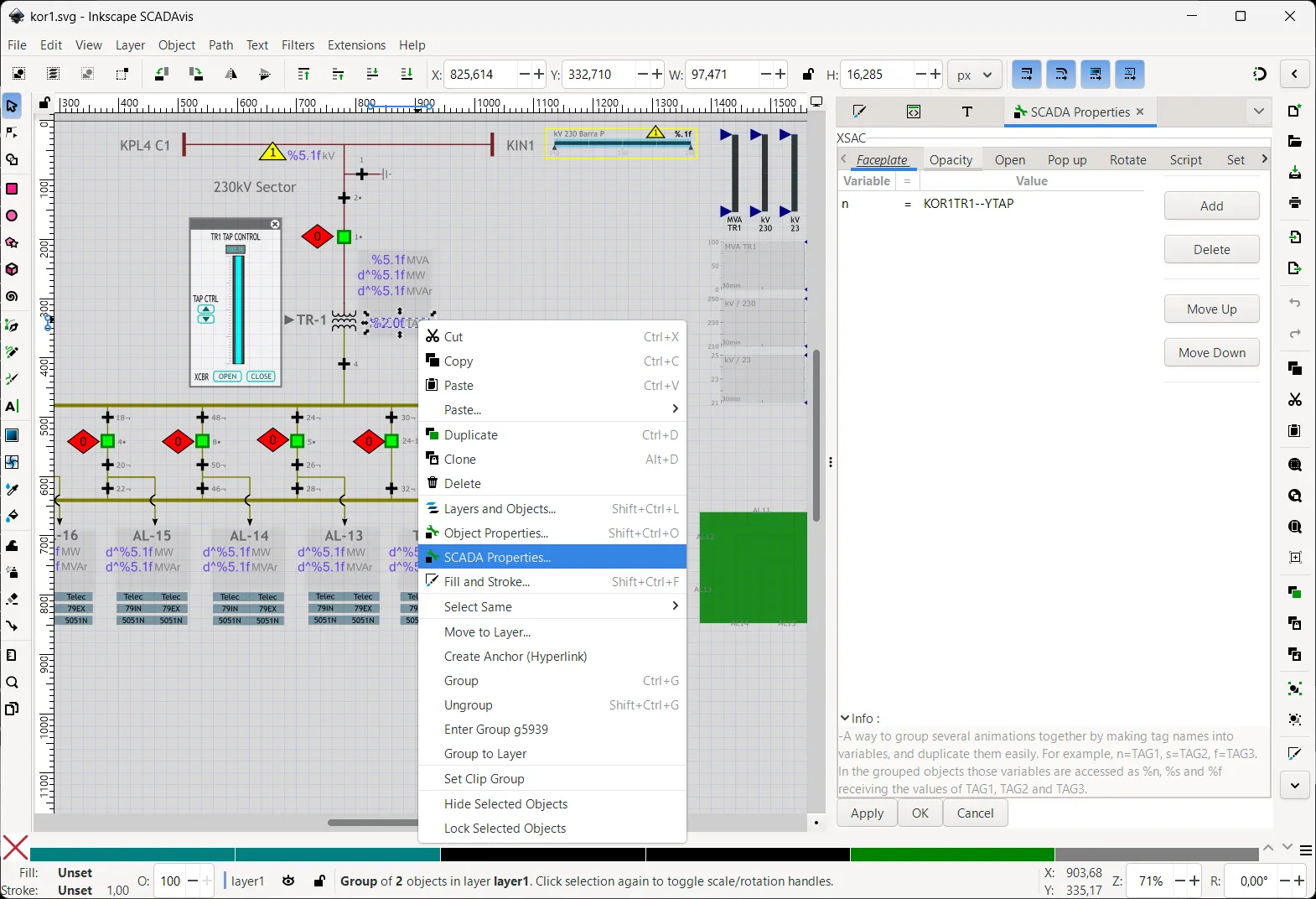
Authoring environment

SVG editor for data-linked animations

Based on Inkscape 1.4.3 and adapted for data-linked animation, the editor lets teams build displays with vector precision.

Precise SVG workflow Keep assets portable, crisp, and maintainable across deployments.
Tag-aware animation setup Bind rotation, fill, stroke, text, position, and behavior directly to process values.
Windows distribution Secure and affordable. Available through Microsoft Store for Windows 10/11.
Enterprise Off-store distribution available for enterprise. Request licensing details
SCADAvis.io SVG editor interface
Commercial model

Open access for builders, support when the rollout gets serious.

The toolkit is free to use. Paid support is there for teams that need long-term maintenance, response, and commercial assurance.

Start here

Free toolkit

$0 forever
  • Unlimited usage
  • Open source access
  • Self-hosted or online
  • Rolling releases
  • Great for pilots, professionals, and startups
Start learning
Recommended for scale

Enterprise support

$899 per year
  • Everything in the free toolkit
  • Email support
  • 5-year LTS versions
  • Off-store editor installer
  • Best for large organizations
Contact sales